
SQL for Data Analysts: The Only Roadmap You Need in 2026
What Is the SQL Roadmap for Data Analysts in 2026?
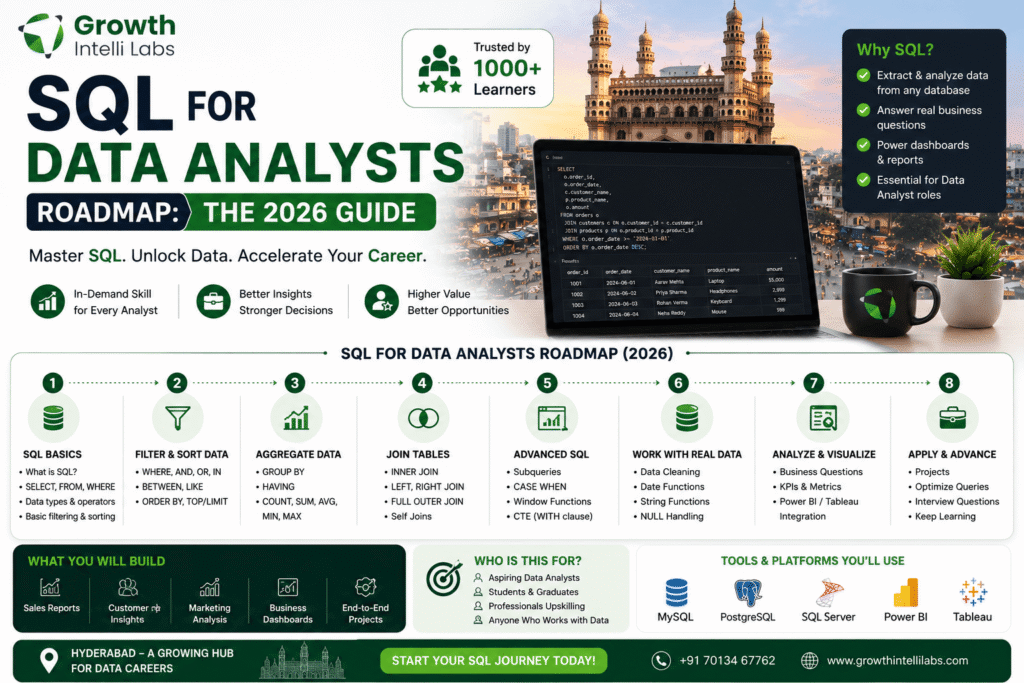
This SQL for data analysts roadmap moves through five stages: query fundamentals (SELECT, WHERE, ORDER BY), aggregations (GROUP BY, HAVING), joins across multiple tables, CTEs and subqueries for layered logic, and window functions for ranking and running calculations. Most learners with consistent practice reach job-ready SQL in roughly 8 to 10 weeks, though this varies by prior experience and hours invested.
That progression is not arbitrary – it mirrors how interviewers actually test SQL and how real analytics work is structured on the job. You rarely write a single flat query in production; you filter data, join it across two or three tables, group it into a summary, and then rank or compare rows against each other using window functions. A good roadmap teaches concepts in the order you will actually use them, not in the order a textbook happens to list them.
This guide lays out that roadmap in detail – what to learn each week, how SQL fits alongside Excel, Power BI, and Python, the interview questions recruiters keep asking in 2026, and the mistakes that quietly stall most self-taught learners.
Why SQL Is Still the #1 Skill for Data Analysts
SQL remains the single most requested technical skill in data analyst job postings because it is the language every business database, warehouse, and BI tool speaks underneath the dashboard. Even analysts who work primarily in Power BI or Tableau are frequently expected to write or debug the SQL queries feeding those reports.
Career-guide roadmaps from platforms like Dataquest consistently position SQL as a “priority skill” that shows up in nearly every analyst job description, often placed right alongside – or even ahead of – Python and statistics in the learning sequence. The reasoning is straightforward: Excel struggles once datasets grow past a few hundred thousand rows or need to be joined across multiple source tables, while SQL is purpose-built for exactly that job. It is also the interface analysts use to pull data out of the data warehouses (Snowflake, BigQuery, Redshift, Postgres) that most mid-size and large companies now run on.
For a Hyderabad-based analyst market in particular, employers hiring for data analytics, BI, and reporting roles routinely list SQL as a mandatory skill, with Excel and a visualization tool (Power BI or Tableau) as close seconds. Structured, project-based training – like the Data Analytics Course in Hyderabad – is built around that reality, sequencing SQL early because everything else in the analyst toolkit depends on being able to query data confidently first.
The SQL Skill Stack: What You Actually Need to Learn
The SQL skills that actually get tested in data analyst interviews and used on the job fall into three layers: foundational query writing, intermediate data-shaping skills (joins, grouping, subqueries), and advanced analytical skills (CTEs, window functions, and basic query optimization). You do not need database administration skills – you need query fluency.
Layer 1 – Foundations
- SELECT, WHERE, ORDER BY, LIMIT – filtering and sorting rows
- Data types and NULL handling – a recurring interview trap, since
NULL = NULLevaluates to false, not true - Basic string, date, and numeric functions –
CONCAT,DATE_TRUNC,ROUND,CASE WHEN
Layer 2 – Data Shaping
- Aggregations –
COUNT,SUM,AVG,GROUP BY,HAVING - Joins –
INNER,LEFT,RIGHT,FULL OUTER, self-joins, and anti-joins (finding rows in one table with no match in another) - Subqueries – nested
SELECTstatements used for filtering, thresholds, and derived columns - Set operations –
UNION,UNION ALL,INTERSECT,EXCEPT
Layer 3 – Analytical SQL (What Separates Junior From Job-Ready)
- CTEs (
WITHclauses) – breaking a complex query into readable, named steps - Window functions –
ROW_NUMBER(),RANK(),DENSE_RANK(),LAG()/LEAD(), andSUM() OVER (...)for running totals and moving averages - Query optimization basics – reading an
EXPLAINplan, understanding when an index helps, and rewriting a slow correlated subquery as a join
Industry interview-prep resources are consistent on this point: joins, GROUP BY with aggregation, subqueries, and NULL handling appear in almost every SQL interview, while window functions and CTEs are increasingly expected as a way to separate candidates who can write elegant, efficient queries from those who can only write working ones.
The Week-by-Week SQL Roadmap (Zero to Job-Ready)
Here is the week-by-week breakdown of this SQL for data analysts roadmap. A realistic SQL roadmap for a complete beginner runs about 8 to 10 weeks at a steady pace of 1-2 hours a day, or can be compressed to 5-6 weeks with more intensive daily practice. Treat the timeline below as an indicative pace, not a guarantee – prior exposure to databases, math comfort, and daily practice time will shift it in either direction.
| Stage | Focus | What You Should Be Able to Do by the End |
|---|---|---|
| Week 1-2 | SQL fundamentals: SELECT, WHERE, ORDER BY, data types, NULLs | Write clean single-table queries with filters and sorting |
| Week 3 | Aggregations: GROUP BY, HAVING, COUNT/SUM/AVG | Summarize data into business metrics (e.g., revenue by region) |
| Week 4 | Joins: INNER, LEFT, RIGHT, FULL, self-joins, anti-joins | Combine 2-4 related tables correctly without duplicating rows |
| Week 5 | Subqueries and set operations | Nest queries for filtering and combine result sets with UNION |
| Week 6 | CTEs (WITH clauses) |
Break a 40-line query into readable, testable steps |
| Week 7-8 | Window functions: RANK, ROW_NUMBER, LAG/LEAD, running totals | Solve “top-N per category” and month-over-month growth problems |
| Week 9 | Query optimization and EXPLAIN plans | Spot and fix an obviously slow query |
| Week 10 | Portfolio projects and mock interviews | Explain your query logic out loud, under light time pressure |
This pacing broadly matches how structured data analyst programs sequence SQL – most place it as a dedicated multi-week block after basic tooling and before (or alongside) statistics and visualization, rather than trying to teach it in a single crash-course weekend. A cohort-based, mentor-led format – such as the SQL and analytics modules inside GrowthIntelliLabs’ Data Analytics Course in Hyderabad – tends to compress this timeline because doubts get resolved same-day instead of stalling self-study for a week.
SQL vs Excel vs Power BI vs Python: Where SQL Fits in Your Toolkit
SQL is not a replacement for Excel, Power BI, or Python – it is the layer that feeds all three. In a typical analyst workflow, SQL pulls and shapes raw data from a database, Excel or Power BI turns that data into reports and dashboards for stakeholders, and Python (optional but increasingly common) handles heavier statistical analysis, automation, or machine-learning-adjacent work.
Here is roughly how the four tools divide responsibility in a modern data analyst’s day-to-day work:
- SQL – extracting, filtering, joining, and aggregating data directly from databases and warehouses; the starting point for almost any analysis
- Excel – quick ad hoc analysis, pivot tables, lightweight modeling, and sharing results with non-technical stakeholders who live in spreadsheets
- Power BI / Tableau – turning query outputs into interactive, refreshable dashboards for ongoing business monitoring
- Python – statistical testing, forecasting, web scraping, and automating repetitive data-prep steps that would be painful in SQL or Excel alone
Recent industry roadmaps and tooling guides consistently list this same four-tool combination – SQL, Excel, a BI tool, and Python – as the core data analyst stack for 2026, with SQL and Excel treated as near-universal requirements and Python treated as a strong differentiator rather than a strict must-have for entry-level roles. This is exactly why serious training paths teach them together instead of in isolation: a learner who only knows Power BI but can’t write the SQL behind a dashboard will struggle the moment a live client dataset needs restructuring. Programs that combine SQL, Excel, Power BI, and Python – like GrowthIntelliLabs’ Data Analytics Course in Hyderabad – exist precisely to close that gap, and learners aiming further into predictive modeling and AI-driven analytics often progress into the Data Science Course in Hyderabad once their SQL and Python fundamentals are solid.
Common SQL Interview Questions for Data Analysts
SQL interview questions for data analyst roles typically progress from basic filtering to joins, then aggregations, then window functions, and finally business-scenario problems that combine several concepts at once. Interviewers are less interested in memorized syntax and more interested in whether you can translate a business question into a correct, efficient query.
Common question categories you should expect to practice:
- Joins and NULL handling – “Find all customers who have never placed an order” (a classic LEFT JOIN + IS NULL anti-join)
- Aggregation with HAVING – “Which product categories had average order value above ₹2,000 last quarter?”
- Window functions – “Find the top 3 highest-paid employees in each department” (RANK or DENSE_RANK, partitioned by department)
- Running and moving calculations – “Calculate a 7-day moving average of daily sales” using
AVG() OVER (ORDER BY date ROWS BETWEEN 6 PRECEDING AND CURRENT ROW) - Time-based analysis – month-over-month growth using
LAG(), or identifying consecutive-day user activity streaks - CTEs for layered logic – breaking a cohort-retention or funnel-analysis query into readable named steps instead of one dense nested query
- Query optimization – explaining what an index does, or rewriting a slow correlated subquery as a JOIN
A good habit before any analyst interview: practice explaining your query out loud, step by step, rather than just producing the right answer silently. Interviewers are frequently evaluating your reasoning process as much as the final SQL.
How to Practice SQL the Right Way
Following a SQL for data analysts roadmap only works if practice is deliberate – the fastest way to get job-ready at SQL is scenario-based practice on real or realistic datasets – not passively watching tutorials. Aim for a mix of structured practice problems and self-directed mini-projects using public datasets, so you build both pattern recognition and the ability to work with messy, ambiguous data.
A practice routine that works well for most learners:
- Daily problem sets on platforms built for SQL interview practice, progressing from easy to hard difficulty
- One mini-project per skill layer – e.g., a joins-heavy project analyzing an e-commerce orders dataset, then a window-functions project analyzing time-series sales data
- Timed mock interviews in the final two weeks, explaining your logic under mild time pressure
- Query review – after solving a problem, look at 1-2 alternative solutions to see more efficient approaches (this is where CTEs and window functions often click)
- A portfolio artifact – 2-3 well-commented SQL projects on GitHub that you can walk an interviewer through
Structured, mentor-reviewed practice – where someone actually looks at your query logic and points out inefficiencies – tends to accelerate this stage significantly compared to solo practice, which is one reason cohort-based programs pair SQL modules with live project reviews rather than leaving learners to self-assess.
Common Mistakes That Slow Down SQL Learners
Most learners don’t get stuck on SQL because it’s inherently hard – they get stuck by skipping fundamentals, avoiding messy real-world data, or never practicing explaining their logic out loud. Recognizing these patterns early can save weeks of frustration.
- Jumping to window functions before joins are solid. Window functions build on the same mental model as GROUP BY; skipping ahead usually means backtracking later.
- Only practicing on clean, textbook datasets. Real employer data has duplicates, inconsistent formatting, and NULLs – practice needs to include that mess.
- Memorizing syntax instead of understanding logic. Interviewers change the scenario slightly specifically to catch memorization over understanding.
- Never timing yourself. Comfort with SQL syntax and comfort writing SQL under interview pressure are different skills that need separate practice.
- Learning SQL in isolation from the rest of the toolkit. SQL pulls the data; Excel, Power BI, and Python do something with it. Learning them together, as in a structured Data Analytics Course in Hyderabad, mirrors how the job actually works.
Frequently Asked Questions
How long does it take to follow a SQL for data analysts roadmap to a job-ready level?
Most beginners reach job-ready SQL proficiency in about 8 to 10 weeks with consistent daily practice (1-2 hours a day), or 5-6 weeks with more intensive study. This is an indicative range, not a guarantee – your pace depends on prior technical exposure, math comfort, and how consistently you practice on real problems rather than just watching tutorials.
Do I need to learn Python before SQL, or can SQL come first?
SQL can absolutely come first, and many analyst roadmaps recommend starting there since it’s the more universally required skill for entry-level data analyst postings. Some roadmaps sequence basic Python or Excel earlier for general data-handling comfort, but SQL is rarely optional, so prioritizing it early is a safe strategy regardless of the exact order.
What SQL topics are most commonly asked in data analyst interviews?
Joins, GROUP BY aggregations, subqueries, and NULL handling appear in almost every SQL interview, while window functions (RANK, ROW_NUMBER, LAG/LEAD, running totals) and CTEs are increasingly expected to distinguish stronger candidates. Query optimization basics, like reading an EXPLAIN plan, show up more often in mid-level and senior interviews.
Is SQL enough to get a data analyst job, or do I also need Power BI and Python?
SQL alone can open some doors, but most 2026 data analyst job postings expect SQL plus at least one visualization tool (Power BI or Tableau) and basic Excel, with Python as a strong differentiator. Employers generally want to see that you can take data from a database all the way to a business-ready insight, which requires more than SQL in isolation.
What’s the difference between a CTE and a subquery in SQL?
A CTE (Common Table Expression, written with a WITH clause) names a temporary result set that you can reference one or more times later in the query, while a subquery is a nested query embedded directly inside another statement. CTEs generally make complex, multi-step logic easier to read and debug, which is why they’re favored for layered business logic like funnel or cohort analysis.
Can I learn SQL for free, or should I take a structured course?
You can learn SQL fundamentals for free using public tutorials and practice platforms, and many learners do reach a solid baseline this way. A structured, mentor-led course tends to help most with the parts self-study struggles with getting timely feedback on query logic, working with realistic messy datasets, and staying accountable to a timeline instead of stalling indefinitely.
CTA
Ready to turn this SQL for data analysts roadmap into an actual job-ready skill instead of another bookmarked article? GrowthIntelliLabs’ Data Analytics Course in Hyderabad is built around exactly this SQL-first sequence – fundamentals, joins, CTEs, and window functions – taught alongside Excel, Power BI, and Python so you leave with a toolkit employers actually ask for, not just isolated SQL knowledge. If your goal is to go further into predictive analytics and Gen AI-driven workflows, the Data Science Course in Hyderabad builds on the same SQL and Python foundation.
Visit GrowthIntelliLabs in Kukatpally, Hyderabad, or call +91 9985199299 to talk to a counselor about which track fits your background and timeline.